Comfort Clipboard Pro software logo

Comfort Clipboard Pro

Pro Verified

Comfort Clipboard Pro is a clipboard extender for Windows that automatically saves everything you copy — text, images, links, and files — so you can paste any earlier fragment again instead of losing it.

★★★★★ 4.8 (0 comments) •Updated: October 2, 2026 • 100% Safe & Clean
v9.6.3.0 Windows Desktop 64-bit System & Utilities

How Comfort Clipboard Pro Manages Your Clipboard History

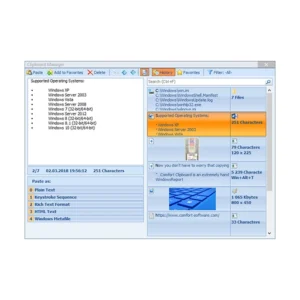
Comfort Clipboard Pro is a clipboard extender that monitors everything copied to the Windows clipboard and stores each item in a filterable history you can return to later. Instead of pasting only the most recent fragment, you open the manager and choose from hundreds of earlier entries, preview them, and drop the right one straight into the active field. Each entry shows its format, the application it came from, and a preview, so identifying a fragment takes seconds. You can edit text before pasting, assign a hotkey to a frequently used fragment, or paste several fragments in one action. The result is a clipboard that behaves like a working reference instead of a single-slot scratchpad.

Where Comfort Clipboard Pro earns its keep is in the details of daily copy-and-paste work. Every fragment is listed with its format icon and the application it came from, and you can rename an entry so its contents stay hidden from anyone glancing at your screen. Favorites hold reusable snippets such as addresses, signatures, or code lines within one click, filters narrow a long history down quickly, and the monitor can be switched off for applications where you would rather it stayed out of the way. Data is kept on your own machine and can be protected with encryption, so a crash or reboot does not wipe your history. Readers who also work with message queues may find the site's QueueExplorer guide a useful companion.

Benefits of Using Comfort Clipboard Pro

The immediate benefit of Comfort Clipboard Pro is that nothing you copy is ever lost to the next copy. That single change removes the small, constant friction of retyping a line you overwrote thirty seconds ago, hunting through a document for a link you already had, or reopening a file just to grab a path again. Because the history survives reboots and crashes, a long research session or a batch of edits can be resumed exactly where it stopped. Hotkeys turn frequently used fragments into instant inserts, favorites turn the manager into a personal library of boilerplate, and encryption keeps sensitive fragments readable only to you. Paste several fragments at once and the savings multiply further. The software stays out of the way until you call it, then hands you the exact fragment you need in a couple of keystrokes.

Comfort Clipboard Pro Features

✓

Automatic Clipboard History

Comfort Clipboard Pro captures every fragment you copy — text, links, images, files, and other formats — and files it into a browsable history. You can scroll back through past copies at any time and put any of them back on the clipboard, so a single overwrite no longer destroys something you still needed.

✓

Rich Fragment Details and Preview

Every saved entry shows a preview of its contents, its format icon, and the application it was copied from, so you can tell two similar snippets apart without pasting either one first. The manager also shows which formats a fragment can be pasted in, which matters when one copy carries both plain text and rich formatting.

✓

Edit Fragments Before You Paste

You can correct a text fragment inside the manager, tidy its spacing, or adjust a URL before it lands in the target application. Colors and display names keep long lists readable: assign a color to group fragments visually, or add a display name that hides the real contents from anyone reading over your shoulder.

✓

Hotkeys for Instant Pasting

Assign a keyboard shortcut to any fragment and it becomes a one-press insert, which suits the phrases, addresses, and code lines you paste dozens of times a day. Because the hotkey works from whatever application is in front of you, there is no need to open the manager just to reuse a familiar fragment.

✓

Favorites and Filtering

Mark frequently reused fragments as favorites so they stay at hand, then filter a long history down to the entries that match what you need. This keeps the list manageable even after thousands of fragments have accumulated, and it makes recurring boilerplate a single click away rather than a hunt through old copies.

✓

Paste Several Fragments at Once

Select multiple entries and paste them together in one action, which helps when assembling an email from several saved lines, filling a form from stored values, or moving a batch of text between documents. The combined paste Comfort Clipboard Pro performs removes the repeated window switching that pasting fragments one at a time normally requires.

✓

Encryption and Local Storage

Saved fragments stay on your own computer and can be protected with strong encryption, so the history cannot be read without your password. Encryption also means clipboard content survives a system crash or power failure without being exposed afterwards, which matters when you copy client details, internal notes, or long passages of draft writing.

✓

Application Exceptions and Tray Access

The clipboard monitor can be switched off for chosen applications, so password fields and specialist tools are never recorded. Program events can play a sound for confirmation, and the manager is reachable from an icon near the system tray, letting you pull up the history without leaving the window you are working in.

Old Versions

Version 9.6.2.0
Updated August 11, 2026
Version 9.6.1.0
Updated June 5, 2026
Version 9.6.0.0
Updated May 21, 2026
Version 9.5.0.0
Updated May 6, 2026

Frequently Asked Questions About Comfort Clipboard Pro

Comments

Leave a Reply

Your email address will not be published. Required fields are marked *