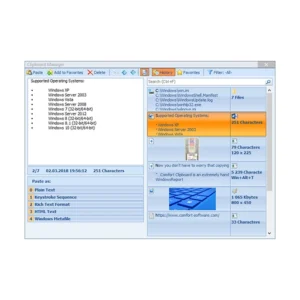
Comfort Clipboard Pro is a clipboard extender that monitors everything copied to the Windows clipboard and stores each item in a filterable history you can return to later. Instead of pasting only the most recent fragment, you open the manager and choose from hundreds of earlier entries, preview them, and drop the right one straight into the active field. Each entry shows its format, the application it came from, and a preview, so identifying a fragment takes seconds. You can edit text before pasting, assign a hotkey to a frequently used fragment, or paste several fragments in one action. The result is a clipboard that behaves like a working reference instead of a single-slot scratchpad.
Where Comfort Clipboard Pro earns its keep is in the details of daily copy-and-paste work. Every fragment is listed with its format icon and the application it came from, and you can rename an entry so its contents stay hidden from anyone glancing at your screen. Favorites hold reusable snippets such as addresses, signatures, or code lines within one click, filters narrow a long history down quickly, and the monitor can be switched off for applications where you would rather it stayed out of the way. Data is kept on your own machine and can be protected with encryption, so a crash or reboot does not wipe your history. Readers who also work with message queues may find the site's QueueExplorer guide a useful companion.
The immediate benefit of Comfort Clipboard Pro is that nothing you copy is ever lost to the next copy. That single change removes the small, constant friction of retyping a line you overwrote thirty seconds ago, hunting through a document for a link you already had, or reopening a file just to grab a path again. Because the history survives reboots and crashes, a long research session or a batch of edits can be resumed exactly where it stopped. Hotkeys turn frequently used fragments into instant inserts, favorites turn the manager into a personal library of boilerplate, and encryption keeps sensitive fragments readable only to you. Paste several fragments at once and the savings multiply further. The software stays out of the way until you call it, then hands you the exact fragment you need in a couple of keystrokes.

Comments